How to organize information on your computer without more busywork
A practical way to save messages, links and notes on Windows, organize them by context and find them when you need them.

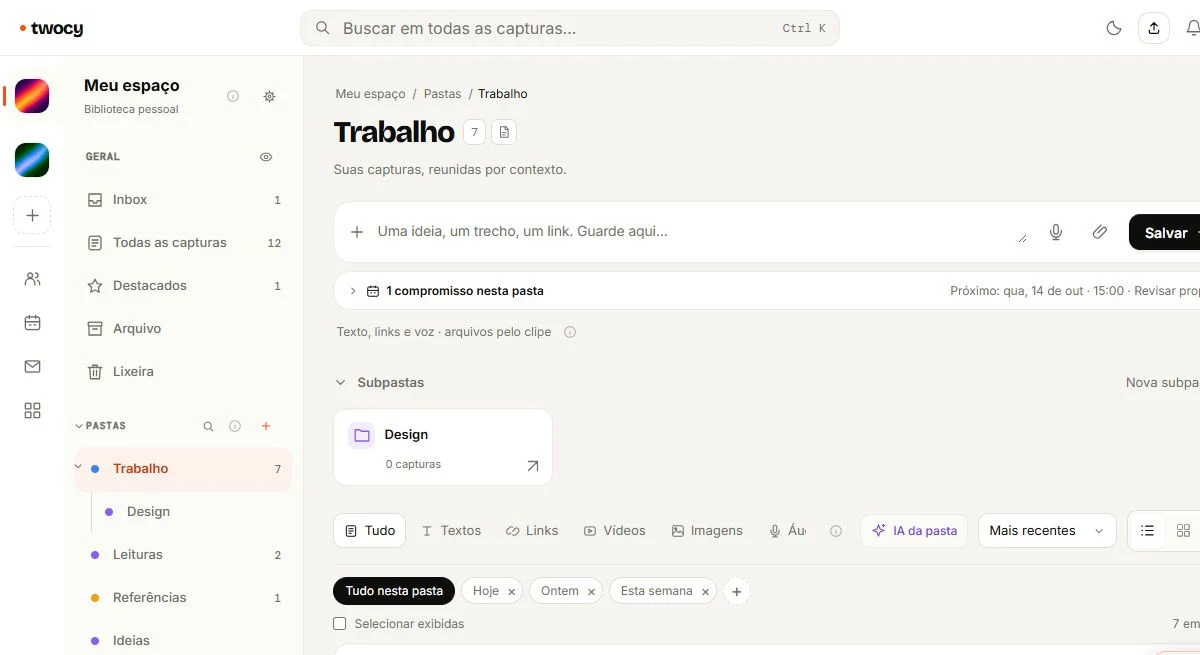
Separate capturing from organizing. Use an Inbox when the destination is unclear, create a few folders around real projects and add titles you can recognize later. Review your Inbox when something needs a decision or an action.
Start with what you need to find again
A message to yourself, a screenshot on your desktop and a link in an open tab all solve the immediate problem of keeping something. Later, each sends you to a different place to look for it.
Before designing a folder system, choose three pieces of information you used this week. Ask when you would need each one again. A quote belongs to a client, a reference belongs to a project, and an idea without a next step can wait. The situation in which you will use the information is a useful organizing principle.
You do not need to move everything at once. Start with what you save today, and bring older material over when it becomes useful. A small library you actually consult is easier to maintain than a migration you never finish.
Keep a quick Inbox for undecided items
An Inbox is a temporary destination. It lets you save something during a conversation or a research session without stopping to plan its entire home.
- Select the useful part, rather than an entire conversation by default.
- Keep the content and its source URL when available.
- Choose a folder if the context is clear. Otherwise, use your Inbox.
- Add a short note about why you saved it if that is not obvious.
With Twocy installed and signed in on Windows, hold Ctrl and press C twice. The capture wheel appears near your mouse. Choose a folder to save there, or use the center to save in the selected space's Inbox. In the web dashboard, the quick capture field lets you type or paste instead.
A capture is not a complete archive of the source. A saved snippet may remain useful if a website changes, but it does not guarantee that the full page or its attachments are preserved.
Organize around context, not a perfect folder tree
A folder may be enough for a small project. A space becomes useful when a client or project needs its own library. Read Folders versus spaces for the distinction and the conversion workflow.
For a launch campaign, start with one folder. Add sections for the brief, references, drafts and approvals only when they help you work. If you later want to focus on that context separately, turn the folder into a space and review the conversion preview.
Names such as “Website research” and “Support replies” suggest when to use the material. “Stuff” and “Miscellaneous” often become another Inbox. The same applies to capture titles: “Print shop quote for launch stickers” is easier to recognize than “Copied text.”
Make one decision per capture
When reviewing your Inbox, decide whether each item is a reference, an idea, an action or something you no longer need. You do not have to enrich every note.
- Reference: keep the relevant snippet and source in the project folder.
- Action: write the next step clearly and check the date, time and owner.
- Idea: keep it without inventing a deadline.
- Outdated material: archive or remove it when appropriate.
TwocyAI can help with organization and writing, depending on your plan and usage limits. Check suggestions before applying them, particularly names, amounts and instructions from another person. See how to review writing with AI.
Test your system with a real search
Try to answer a question using your library: find a reference by client, a phrase in the content or the project folder. If you struggle, improve the title or destination of that item rather than rebuilding everything.
For a link, add a sentence explaining which part matters and where you might use it. Our link organization guide includes a reusable reference template.
Check access before putting a private conversation or client material in a shared space. A convenient destination is not automatically an appropriate one.
A useful routine makes capturing quick, organizing manageable and retrieval practical. Choose one real piece of information today and follow that complete path.
An Inbox review checklist
For each capture:
1. Is this still useful?
2. Which context needs it?
3. Does the title help me find it?
4. Is there a source or URL to preserve?
5. Is this a reference, idea or action?
6. Who can access it?
7. Do I need to verify a name, amount or deadline?
Frequently asked questions
Do I need to organize before saving?
No. Use the Inbox and choose a destination later. When the context is already clear, saving directly to a folder saves a step.
Does Twocy replace a backup?
No. Captures help you keep and retrieve information, but they do not replace backups of your conversations, files or original sources.

Try it with something you want to save.
Choose a useful snippet, save it in the right context and find it again in your library.
Download Twocy